For Xero-powered businesses

Connect Xero to Power BI — live financial dashboards, automated.

Stop exporting Xero to spreadsheets every month. We connect Xero to Microsoft Fabric and Power BI — so revenue, expenses, profit, cash flow and AR/AP update automatically, in real time.

No more manual exports Built for you, done-for-you Real-time, governed data
The problem

Xero runs your books. It shouldn't run your reporting too.

Most growing businesses still pull numbers by hand — and pay for it in time, errors, and decisions made on stale data.

📤

Endless manual exports

Every report means another export from Xero to Excel — hours lost, and a fresh chance for copy-paste errors.

🧩

Numbers scattered everywhere

Revenue, expenses and cash flow live across disconnected reports and spreadsheets. No single source of truth.

📉

Static, backward-looking reports

By the time the report is built, the month is over. Trends and warning signs are hard to spot.

🪜

It doesn't scale

As you grow, the manual reporting process gets slower and more fragile — exactly when you need it most.

See it live

Real Xero Power BI dashboards, built on Microsoft Fabric.

These are live, drill-down financial dashboards we build for clients — powered automatically from Xero through Microsoft Fabric. Executive finance, cash flow, and AR/AP, all in one governed model.
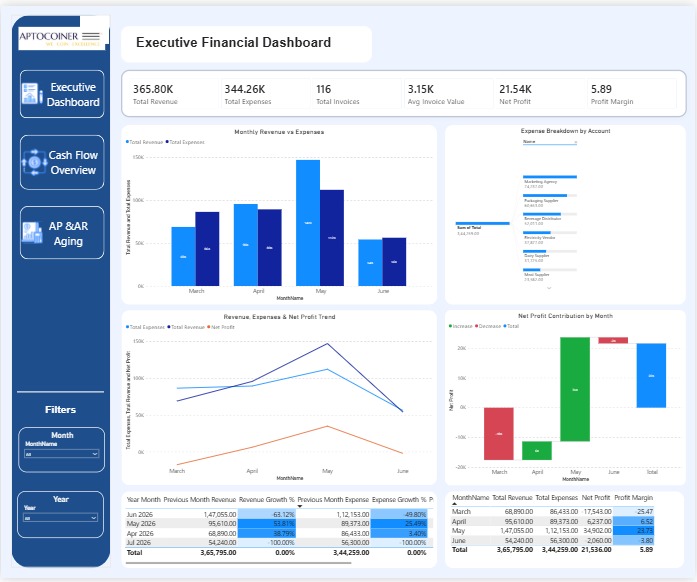
Xero Power BI executive financial dashboard showing revenue, expenses, net profit and profit margin
Executive Financial Dashboard — revenue vs expenses, net profit and KPI trends
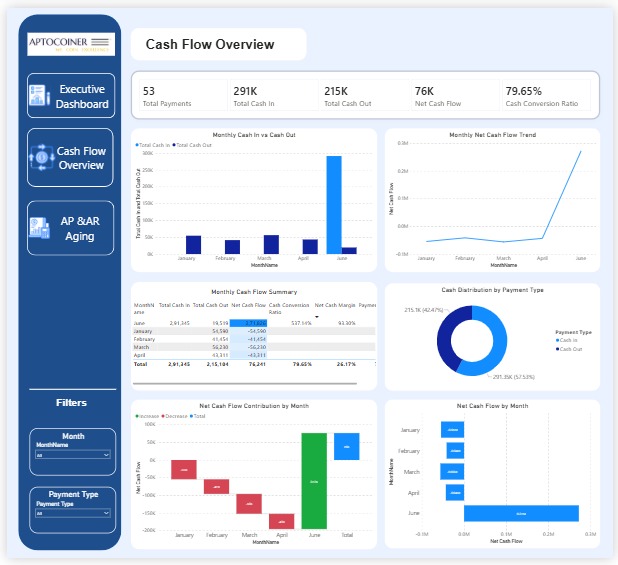
Xero Power BI cash flow overview dashboard showing cash in, cash out and net cash flow
Cash Flow Overview — cash in vs cash out, net cash flow trend and conversion
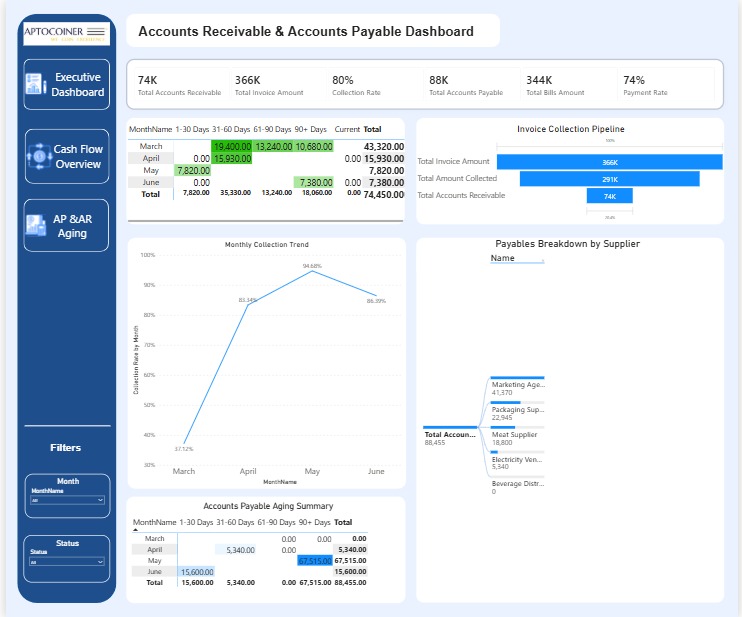
Xero Power BI accounts receivable and accounts payable aging dashboard
AR & AP Aging — collection pipeline, aging buckets and payables by supplier
Executive financial overview Revenue & income analysis Expense tracking Profit & loss Cash flow analysis AR & AP aging KPI & trend tracking Interactive drill-down
Watch the walkthrough

See the Xero → Power BI solution in action

A short walkthrough of the real dashboards — Xero data flowing securely through Microsoft Fabric (authenticated with Azure Key Vault, refreshed automatically) into a live Power BI model. From raw accounting data to boardroom-ready insight, without the manual work.

Get the step-by-step guide →
How it works

From Xero to a live dashboard — fully automated.

A secure, governed pipeline built on Microsoft Fabric's medallion architecture, with Azure Key Vault managing credentials. Set up once, runs on its own.

1
Connect

Xero API + OAuth 2.0

Securely authenticate the Xero API with OAuth 2.0 and offline access; credentials are stored in Azure Key Vault, never in code.

2
Bronze layer

Raw data ingested

Your Xero organization data lands automatically in OneLake — a complete, raw copy to build on, with automatic token refresh.

3
Silver layer

Cleaned & transformed

ETL in Fabric notebooks (PySpark) cleans, joins and standardizes the Xero financial data.

4
Gold layer

Power BI ready

A star-schema warehouse feeds interactive Power BI dashboards your team can explore.

Real time

Data syncs automatically — no more month-end export marathons.

One source

Revenue, expenses, profit and cash flow unified in a single governed model.

Scales with you

An enterprise-grade platform that grows as your business does.

Free guide

How to connect Xero to Microsoft Fabric & Power BI

The exact step-by-step approach we use to turn Xero into automated Power BI dashboards. Download it free — instant access.

  • Every step, from Xero OAuth setup to a live Power BI dashboard
  • What you need before you start (Xero developer app & access)
  • Securing credentials with Azure Key Vault
  • The Bronze / Silver / Gold pipeline, explained simply
  • How to automate token refresh — and pitfalls to avoid

Get the free setup guide

Enter your details — the download unlocks instantly.

Instant access — your download unlocks right away. No spam.

Our consulting services

More than Xero dashboards.

Aptocoiner Analytics is a Microsoft Fabric partner. Explore the full range of what we build for data-driven businesses.

Xero + Power BI

How to connect Xero to Power BI

The quick answers — plus a full step-by-step guide if you want the detail.

Can Power BI connect to Xero?

Yes. Power BI can connect to Xero through the Xero API (using OAuth 2.0), through third-party connectors, or by routing Xero data through a data warehouse such as Microsoft Fabric. The warehouse approach is the most reliable for automated, always-current dashboards.

How do I export Xero data to Power BI?

Register a Xero developer app, authenticate with OAuth 2.0 (with offline access for a refresh token), pull the data you need from the Xero API, land it in Power BI or a warehouse, model it, and schedule a refresh so dashboards stay current. Storing credentials in a secret store like Azure Key Vault keeps the pipeline secure.

Is there a direct Xero connector for Power BI?

There are third-party connectors for Xero, but no single official Power BI connector covers every scenario. For larger or automated setups, ingesting Xero data through the API into a data warehouse first is more reliable and scalable.

What can a Xero Power BI dashboard show?

A Xero Power BI dashboard can show revenue vs expenses, net profit and margin, cash flow (cash in vs cash out), accounts receivable and payable aging, collection rates, and KPI trends over time — all refreshed automatically from your Xero organization.

How do I keep Xero Power BI dashboards up to date?

Use scheduled refresh in Power BI. For robust automation, land Xero data in a warehouse on a schedule with automatic OAuth token refresh, and have Power BI read from there — this avoids expired tokens and API limits.

Read the full step-by-step guide →

Ready to modernize?

Let's build your live financial dashboard.

Whether you're on Xero, QuickBooks, SAP or Dynamics 365, we'll design and build a done-for-you analytics solution on Microsoft Fabric and Power BI. Book a free discovery call to see what's possible.